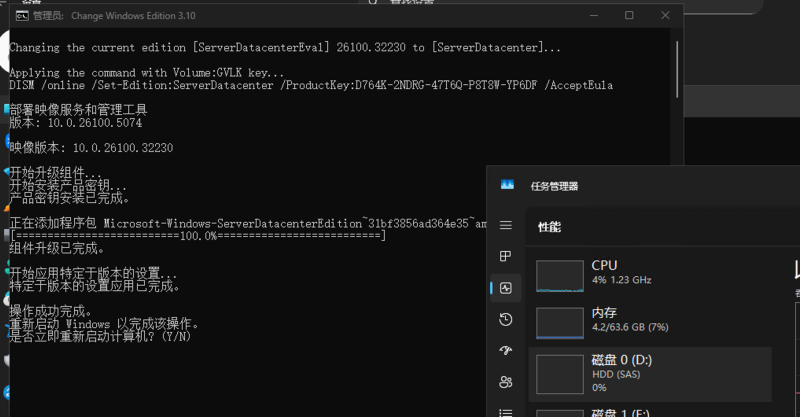



在微软官网下载的 Windows Server 系统为试用版/评估版,这些版本允许用户(尤其是 IT 专业人士)在购买决策前测试和评估不同 Windows 版本的功能与性能。有180天的评估期限,超过了期限会在开机的一定期限后自动关闭系统(重点)。想要将 Server 系统激活简单来说有以下步骤
- 检查系统版本,是否评估版
- 将评估板转化为标准版或数据中心版
- 激活系统
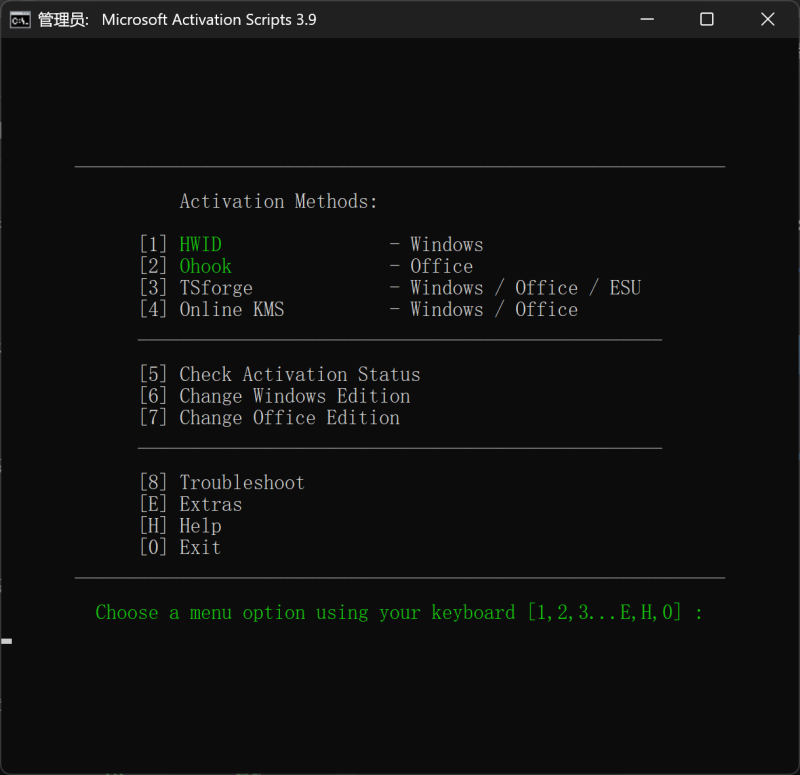
使用 Microsoft 激活脚本(MAS)可以轻松实现以上部分,除此之外,他还可以下载和激活 Office、下载正版 Windows 系统、
![图片[1]-Windows Server 评估版本转换与激活-胡宗胜的个人博客👤](https://huzongsheng.cn/wp-content/uploads/2026/02/image-36-1024x534.png)
Check Activation Status,除了指示系统版本,它还指示是否正在使用评估(系统名是否为包含 Eval )版本。必须先将评估版本转换为非评估版本,然后才能激活。尝试激活评估版是激活错误0xC004F050的常见原因。
![图片[2]-Windows Server 评估版本转换与激活-胡宗胜的个人博客👤](https://huzongsheng.cn/wp-content/uploads/2026/02/image-37-966x1024.png)
![图片[3]-Windows Server 评估版本转换与激活-胡宗胜的个人博客👤](https://huzongsheng.cn/wp-content/uploads/2026/02/image-40-1024x930.png)
![图片[4]-Windows Server 评估版本转换与激活-胡宗胜的个人博客👤](https://huzongsheng.cn/wp-content/uploads/2026/02/image-39-1024x871.png)
![图片[5]-Windows Server 评估版本转换与激活-胡宗胜的个人博客👤](https://huzongsheng.cn/wp-content/uploads/2026/02/image-38-1024x449.png)
参考链接
Windows Server:如何将评估版转换为非评估版 From Dell support
Windows Server:对 slmgr 命令的许可和激活问题进行故障处理 From Dell support
https://learn.microsoft.com/en-us/windows-server/get-started/upgrade-conversion-options
https://massgrave.dev/evaluation_editions#windows-server-evaluation
© 版权声明
文章版权归作者所有,未经允许请勿转载。
THE END


暂无评论内容